[Looking for Charlie's main web site?]

Feel like an iphone app is "missing" features? Maybe you're not being notified of its updates

I wanted to pass along this little surprise I had today. You may, like me, have some apps on your iphone that ARE NOT BEING updated! In other words, though you may frequently check the itunes app store app for updates and receive many for some apps, you may be getting NONE for others.

This was happening to me until today. Here's how I found out and what I did about it. Hope it may help others. (Maybe this is old news to some, but it was a surprise for me and a classic bad news/good news situation.)

Update: Problem now understood

Since posting this entry, I've learned an explanation for what I was observing (thanks to Dan Switzer and others sharing their comments below to understand it). It was a case of "new" versions of the apps being created which meant that the "old" version i had was no longer being updated, and I had simply missed news of the new app. Hope that may help someone. I leave the rest of the blog entry below in case the details may interest anyone.

How I found out

So I have a couple of iphone apps I use all the time which until today, I was annoyed that seemingly obvious annoyances/limitations were not being resolved by updates. Was no one else annoyed by these? Really? Or was the developer perhaps being lazy? I lived with them. Hey, most of the apps are free or cheap.

But then today I got an email from one vendor highlighting new app features to consider in a recent update, and I noticed that they referred to enhancements to one of the very features I wanted, but they wrote as if it was a "long-standing" feature. How could I have never seen it then?

What I did to check it out

So I wondered if perhaps somehow I was NOT getting word of updates.

I remembered how when you visit the itunes store and click on an app you already have, it says "installed". I wondered if perhaps I may find that I could in fact "install" these apps, which I already had, but which seemed to have become long in the tooth.

Sure enough, I could do so (for at least two of several I checked). And holy smokes: the apps had indeed improved quite a bit.

Wow, what a shame that I've been limping along with older versions that lacked features I'd long-wanted.

Lesson learned

So obviously it's possible for apps to somehow become disconnected from their update stream. The app names had not changed, so that's not it. I don't know what happened. (For those who may wonder, in my case the apps were Harvest--for time/expense tracking--and Tweetdeck.)

And therefore I wanted to share this with others in case it may be an issue for you.

Want to help others with this problem?

Finally, does anyone know if perhaps there's some way to automate this investigation? Maybe there's info on the phone that tracks updates, and perhaps can indicate if the connection to itunes updates has broken. I suppose that's not likely.

But maybe there's a place on the phone (or in itunes on the computer it's synced to) which lists installed apps in order of last update. That would at least help highlight which ones to focus on?

Better still, perhaps there's "an app for that" which helps identify and resolve this very problem.

If you know more about this issue, feel free to share.

Bashers not welcome

One last thing: often when I write on a subject to share a solution to a problem, some folks are compelled to use the opportunity to bash whatever it is that I found the problem with. That's really not the point here, folks.

So if you're a delighted droid user, or perhaps just an apple-hater who loves the chance to give 'em a smack, or whatever, please withhold such comments. I'm serious, and I will delete or edit any comments that ignore this warning and are only about that. Let's just focus on the problem at hand, and any helpful solutions/suggestions.

Saving windows command prompt history to a file

Do you find yourself working at the Windows (DOS) command prompt window (aka Start>Run>cmd), and after having entered many commands, wish you could save them to a file, such as before closing the window or perhaps when needing to restart?

This is a bit of esoterica, but as I've seen some searching for a solution in various help forums, I figured I'd share it here. It can be especially useful if you've been using the Microsoft LogParser command-line tool, which allows you to use SQL statements from the command line to analyze log files of all sorts. You may build up a large set of them during a session, and wish you could save them off before closing the command prompt window.

Quick Answer:

doskey /history > commands.log

Explanation

This solution and its meaning will be old hat to some, but it seems to be a revelation to others (judging by how many I found searching for a solution to this challenge, and not being offered any useful answer).

Using the Command History

First, some may know that you can recall past commands on the command prompt (to re-execute them) using the up arrow. You can also "see" a list of the past commands (to choose from them, to re-execute) using f7. But that old-school dos popup can't be edited or saved in any way.

Well, all this command-line history goodness is really driven by a command that's executed implicitly when you open a command prompt window, called DOSKEY.

And if you enter doskey /?, you get some available help (including reminders of the shortcut keys above, and more). But you will see that it has the /history argument I've used, and that lists (to the screen) all the past commands you've entered during the current command prompt session.

Of course, from there, if the list is small enough to appear all on screen, you can just copy/paste the stuff to some file (if you know how to copy content from/to the command window), but if it scrolls off screen, that's where the command I offered is most handy (yes, I know about the "more" command to cause paging of DOS command output, but really, I'd sooner use the one command above then doing a copy, then page forward, and copy. To each his own.)

Piping the history to a file

So saving the displayed history to a file just involves a little more old-school DOS trickeration, whereby you can redirect the output of any command to a file, using the ">" argument, and naming the file to hold the output. The named file will be created in the current directory (indicated in the command prompt window).

Beware, though, that that command will overwrite any previous content in that file. If you want to append to it, instead, use ">>" in the command above. This could be useful if you, for instance, wanted to always write the log to some file, such as in your drive root, so it would become:

doskey /history >> \commands.log

Just be really careful you don't forget those two brackets, or you'll lose what you have!

I instead write it to a file (not worrying where it is), then open it and save that off to evernote. (There may even be some trick to route the save directly to evernote, but I don't know that.)

More on Doskey and command prompt power

For more info on fun with this command prompt doskey and related features, see these docs, which while for XP are good for Vista/Windows 7 (I couldn't find the same content in a more updated page at Microsoft.)

Hope that helps someone. (Just couldn't fit it in a tweet. Darn!)

New for CF9 (and 9.0.1): a query timeout that really works, with a caveat

This is a very interesting change in CF9 (and 9.0.1), which has slipped under the radar for the most part as far as I can tell.

Did you know there is now a setting in the DSN page of the CF Admin (for most DB drivers) that allows you to set a maximum timeout for queries against that DSN? It's a new feature enabled for the DataDirect drivers udpated in CF 9. The caveat? It is ONLY settable there, not in CFQUERY itself, which is a shame (the existing TIMEOUT attribute is not the same and generally does not work). Still, the value of this even at the DSN level is too important to ignore for some challenges. More on that (and some other thoughts) in a moment.

As for the setting, it's in the "Advanced Settings" section for a DSN in the CF 9 Admin, and it's called "Query Timeout". This should not to be confused with the older settings, "Timeout" (which is about inactive connections) or "Login Timeout" (which is about logging in to the connection). The screenshot at right shows all 3. (This blog entry continues, with more information below it.)

I've run a test, and it really does do the job, which is huge. Why? Because it's been a long-time issue that if a CFQUERY got hung up waiting for a response, that request thread (doing the CFQUERY) is then hung until the query finishes, which can sometimes be many minutes, or even hours or days, due to some odd situations. More important, a thread waiting for a query with no timeout can't be terminated (by the JVM, or CF, or the monitoring tools) because the thread was in a native thread state.

With this new option specified, if the request exceeds the timeout, the request does now fail, with a JDBC error, "Execution timeout expired." The same test does NOT timeout with the older cfquery TIMEOUT attribute.

Here are some other notes on the new feature:

  • It works with most of the database drivers. I have confirmed that the setting appears in the DSN settings page for SQL Server, Oracle, MySQL (datadirect), DB2, Informix, Sybase) in CF 9 Enterprise, and in both SQL Server and MySQL (Datadirect) on CF 9 Standard.
  • The timeout's specified in seconds.
  • You can learn more in the CF Admin guide, in this specific page.
  • Oddly, the Admin manual page above only references this new setting in that CF Admin manual is in the the MySQL settings, but again it does appear in all the drivers above.
  • The manual page does even reference the other DBMSs by name in its naming the methods of the Admin API (for other DBMSs) which you can use as well, which can be used to set this default setting in the DSN programmatically.
  • That said, again there is sadly no new QueryTimeout (or QTimeout) attribute for CFQUERY, so for now we can only set this at the datasource level, not per query.
  • I've raised the concerns above on the CF Admin livedocs page (or whatever we are to call it now.)
  • If you look under the covers (in [cf]\lib\neo-datasource.xml), there is in fact a querytimeout connectionstring that this setting controls. If only there was a way we could pass connectionstring values to the CFQUERY, we'd be golden. Some may recall use used to have just such an attribute (ConnectString), but sadly it was deprecated in CF 6. I did try it, to no avail.
  • I will raise have raised a bug with Adobe to get a new attribute for CFQUERY related to this. When I do that, I'll report it here. It's bug 83592. Please add your vote of support for it.
  • There's another page on this Admin setting, in the CF Dev Guide, for those who may be interested in following any other possible places where this feature may be discussed (in the comments there).
  • If you want some code to use to test a request waiting a long time for the DB to return, most databases offer a statement that tells the DB to wait for some time. In SQL Server, that's WAITFOR DELAY 'hrs:mins:secs'. Just use that in a CFQUERY, assuming your DSN definition doesn't limit what SQL statements you can use, in the 'Allowed SQL' section of the Adcanced Settings page.

Why is this setting important?

I think this is a very important setting, and though it has been a hidden gem, it seems, it's one that people should consider. That's why I've flagged this in my CF911 category.

If you're suffering situations where requests are hanging due to long-running queries, and you have not been able to solve the real root cause for why they are hanging (which I always recommend first and foremost), then at least this option can help avoid a situation where queries can run without time limit. An Admin can decide that no queries should be allowed to run more than x seconds.

With that power comes responsibility, of course, and caution. You wouldn't want to preclude someone being able to run a query that really needed to take a long time. That's why it's really better if this was settable on a per-query basis. (And no, the CF page timeout settings are NOT the solution here, because again as I said above, they cannot timeout some kinds of long-running tags, like CFQUERY, CFHTTP, CFINVOKE of a web service, etc.)

What one could do, though (for now), is create different DSNs, where one could be used for most query processing, and another could be used for long-running requests. Yes, it's ok to have 2 DSNs point to the same DB. This same technique has been used when wanting to have most queries run against one DSN with a limited set of "allowed SQL" (per the DSN advanced settings) while another DSN has unfettered SQL access.

Hope this is helpful to some. Let me know what you think, whether this was helpful or if you feel I left something out. Especially please let me know if you may know of a way that we can indeed pass querystring values on a per-query basis.

Better file searching (on Windows) with a powerful, fast, easy tool

Ever need to do a search for files with give text (or of a given name) in Windows? Whether you use a favored editor to do it, or (worse) rely on the anemic/slow Windows find, I'd like to point you to an awesome and free alternative.

For years I've used a great freeware tool, FileLocator Lite (formerly known as Agent Ransack ), and I (as well nearly everyone I show it to) love it for several reasons. Beyond fast, effective, and easy searching, it also has a cool regular expression building wizard that may be reason enough to use the tool when you need to create a RegEx quickly. It's the freeware version of a commercial product, File Locator Pro, and can be found at www.mythicsoft.com/filelocatorlite/.

(Update in 2010: Originally, the free version was only packaged under the name AgentRansack, which was a little scary-sounding for some tastes. The makers finally offered a rebranding of the tool under the name File Locator Lite, though they still also offer it as AgentRansack, being the same product. The makers just seem to have a fondness for the "old" name so are going with both.)

BTW, I do realize that the Windows File Find feature can be enhanced by using its available Indexing Service. I've never been a fan of that for various reasons, and many won't enable such (for good reason) on production servers. Yet you may need to search for files on such a server. This tool can do it with little overhead. And I realize also that later versions of Windows do offer better text file searching, but it's still not as simple as it could be (if the first search doesn't find files, you're offered a chance to do a deeper search). This tool is incredibly simple to use.

Sadly, some people may not ever do searching for files by name or content (or suffer productivity) simply because the available tools are so poor. This one will change your mind!

Definitely favored over other search tools/editors

Since learning of it in about 2004, I no longer use the find feature within editors like Eclipse, DreamWeaver, CF Studio, or various notepad alternatives to search across multiple folders anymore. AgentRansack is so much faster than those in my experience.

It's also not only faster than Windows find, too, but unlike that (in some versions of Windows), it DOES search for content in ALL file types. Have you ever used Windows find to search text in CFM files, and found that it never finds files you know it should? The problem is that it has an internal list of file types it will search, and all others it will simply ignore. It also ignores files marked with the hidden and system attributes, which may not be expected. (By Windows Find I'm referring to the feature available from the Start menu or via WindowsKey-F).

And unlike using your editor to search, it doesn't lock up your editor while it's searching away. And even then, it's really FAST! I find it can search gigs of content in just a few moments--yet it DOES NOT rely on indexing the content in any way.

Another great benefit it has over the other more traditional search approaches is that while the left pane is showing the files it found in its search, a right pane shows (for any file you select on the left) the lines WITHIN the file that matched the search. Yes, in some other search tools the search results pane allows you to click a result to open the given file at the given location where the search result was found, but this approach in AR is just much simpler and more effective, I think.

Perhaps most powerful, it also integrates with the Windows Explorer interface, so it's easily reached by a right-click on any folder to search that folder and its children.

Bonus Regex Feature

As I hinted above, beyond searching, AR is also great for its really nifty regular expression feature, to help build regex's declaratively (with a wizard-like interface). I find myself opening it just to create a RegEx when needed. More than that, there is also a useful "test" menu option where you can enter a RegEx, and some text against which to search, and it will show what the regex would find in that text. Very handy.

Check it out

Everyone I've shown it to has been impressed. Check it out.

You can see screenshots of 3 main parts of the interface in use (including the regex wizard and results viewing aspect) at the site.

The only negative with the tool is its name. Some folks have cringed when I've proposed installing it while trying to help them solve one issue or another. But when they see it's a freeware version of a commercial tool, that generally tames their nerves. The very quick install and immediately obvious benefits quickly wins them over. Again, this problem has now been solved with the optional packaging as File Locator Lite.

I should also mention that this is one of dozens of such file/find tools that I list in a category for their type at my CF411 site, listing over a thousand told and resources of interest to CFers.

Enjoy.

Missing the command menus (file, edit, view, etc.) in IE 7? Here's the fix

It's Christmas, and that means...a few hours of tech support working on the computers of relatives you visit for the holidays. :-) One problem I've encountered a few times (even before now) is someone using IE 7 who says, "Why did they remove the menus, like File, Edit, View? How can I change options or call up help?"

Well, the fix is a pretty simple one, but one may miss it. In case any of my readers (or those googling for a solution) need the help, it's that you can right-click on the area where the menu should be (not on a tab, nor in the address bar above it) and you should see a pop-up set of context menu options to include "menu bar", "links", and "status" among other things.

You want to enable the "menu bar"

You'll notice that the "menu bar" option has no check mark next to it. Click on it, to set it, which will enable the menus. The "menu bar" is indeed what shows the File, Edit, View, and other menu commands. Hope that solves the problem for you, and if so, consider it my little Christmas gift to you.

If that option is already checked, then it may instead be that somehow hidden or moved. One tip is that there is also a "lock toolbars" option on the context menu mentioned above. If you de-select that, some of the various menu items will now show a small gray dotted vertical bar, which you can click on to move the particular toolbar. You may find somehow that the menu bar, if enabled but not visible, has somehow been moved or hidden.

Finally, once you have enabled the menu bar, you can use that "lock toolbars" to make it less likely that you or anyone else will cause it to disappear. Hope that helps.

Add searching for CF blogs, docs, etc. to your FireFox Search bar list of search engines

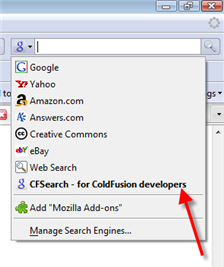
Someone who had learned of my CFSearch search engine (which searches over 1300 CF blogs, docs/article sites, and more) wondered if they could arrange to have it appear in the Firefox Search Bar in the top right of the browser. The answer is yes, via a simple Firefox add-on (which you can use to add any search site to the search bar).

This is a cool thing, because while you can choose from several pre-defined search sites (google, yahoo, amazon, ebay, and more), and you can click a "manage search engines" option to go to a Firefox site to find still more, you can only pick those that are listed on the Firefox site.

As with this gent, some search engines will just never be popular enough to be listed there. So how to add them?

Get the "Add to Search Bar" Add-on

The good news is that there is a FF add-on that does just what he wants, Add to Search Bar. It's simple and very effective (see the comments at the Mozilla page link, where many ask--rightfully so--why it's not built into FF.)

You can also learn more about it in someone else's blog entry highlighting it.

How about accessing a site's search feature using a single keyword in the address bar

FWIW, I'll also note that rather than use the FF toolbar, one can also set things up so that a given page's search feature can be accessed from a single address bar keyword (if they don't have or don't want to alter that search bar in the top right). I blogged about that in my TipicalCharlie site, where I sometimes blog things that aren't of a CF nature but might appeal to just anyone. (Update: tipicalcharlie domain is no more, but page recovered using Archive.org.)

One more time about CSEs

Finally, just as a reminder, the CFSearch site I created is what's called a Google "custom search engine". I wrote previously about them and how other people had also come up with their own variants. You may want to check them out, too.

Goog411 - free 411 service from your phone, with connection, mapping, and more

Tired of paying 411 fees? Next time you're on the road (home or away) and need to find something, use 800 goog-411. That's the number for free (and hands-free) local information.

All you need to do is say where you are, what business or category you want, and hear the closest options (with address). If that's all you need, you can hangup, or you can choose one to be connected to the business, and you can even have a map or text message sent to your phone, again all for free.

Here's a nifty (and fun) couple-minute video about it:

http://www.google.com/goog411/

Ok, maybe you can get info like this from your in-car GPS system, or via google maps on your phone, but at least this is mostly hands free. Add it to your phonebook, and it's just a pushbutton (or voice command) away.

BTW, if you've not noticed, the same feature is offered in google maps itself. While on a map, you can enter a business name or category and it will show where on that map (or an expanded one) you can find what you're looking for.

Don't dismiss the Google toolbar, especially if you're not aware of hidden features

Do you use the Google toolbar, and if you have it, do you use it regularly? If you'd dismiss it, are you aware of all its features, including several hidden ones? I use them every day, and, no, the built-in search box in FF and IE 7 doesn't come close. Let me share a few tips with you if you'd missed these.

This entry was prompted by a survey up on a popular site (makeuseof, which I've blogged about before.) The survey asks people what toolbars, if any, they use in their browsers.

In the current voting most say they use none, and some commenters are dismissing them as "wastes of space". I thought that odd, as I use the google toolbar every day. I offered up the following as a comment, and then thought I'd share it here for my readers (have done only a slight bit of editing from my original comment there):

It's a shame to see some call toolbars a waste of space. OK, so many you've lamented them getting auto-installed on an unsuspecting user's computer, or hated when one tries to do that on yours. But not everyone who has one is an idiot.

For instance, I love the google toolbar and have for years. Sure, I realize that FF (and now IE7) offers a search box, but that's not all that the google toolbar does for you. Unfortunately, some of its best jewels are hidden gems, in that you may need to enable them with the "settings".

I use the "site" button every day (type in a search word and click the button to search what Google knows only about the current site). Sure, you can do it yourself with the "site:" keyword in any google search box you may have, but this is much less typing over the course of a day.

Same with doing a google image or froogle/products search, both buttons you can easily add.

There's also the "up" button that's worth adding, which lets you traverse up a site, whereby it removes whatever's at the end of the currently used URL. Often quite handy. Again, all things you could do yourself manually, but one click is nicer, and makes the toolbar very much worth the space to me.

These and a few other things are tips I first shared back in 2003.

Some features don't use any "space" at all, as the toolbar also enables a context menu on each page you visit. You can right-click the whitespace of any page you visit to see (under "page info" in FF2 and IE7):

  • backward links
  • cached snapshot of page
  • similar pages
  • translate page

Again, all these are things you can do without the toolbar as long as you have a quick google search bar of some sort and know the corresponding google keywords (link:, cache:, etc.). But again I use some of these every day, so I love not having to type those--plus some users would learn this way of these valuable Google features: they might not ever think to learn the keywords (or use the "advanced search" at google.com).

If I have one complaint, it's that I don't understand why these last 4 features aren't enabled as toolbar buttons (that can be added, optionally). I'd give up the space occupied by "send to" and "autolink" (though some may love those), and certainly "check" (the spell check) since that's built into FF. Anyone from Google (or others who might know more about this) care to comment?

Anyway, don't dismiss toolbars (and the google toolbar especially) so readily. You may be missing out on more than you know.

Hope that helps someone. (Actually, for some reason I still don't see my comment posted on the makeuseof blog entry. I suppose they may have some verification process. If I don't see it in a couple of hours, I'll post the above there again.)

Got Digital Voice (or some other cable/phone service) and having problems inside your house?

Jared Rypka-Hauer today wrote of a hassle he's experiencing with Comcast Digital Voice (their phone over cable service), and he asked if others had thoughts. I may well have an answer for him, or perhaps for others even with other similar phone-over-cable service providers. My wife and I were also suffering with it recently, until a rep found and fixed our problem--a hardware problem. Almost classic, from a geek perspective. :-) Perhaps you too may have it.

Did you previously have another phone over cable service before, like Comcast's "Digital Phone"?

The key question is whether you by any chance had the predecessor to Digital Voice, called Digital Phone (or perhaps any other phone-over-cable service that was like it rather than like Digital Voice, as I'll explain). If so, there may be a problem of something that was left behind in a switch to DV from DP, which could be conflicting with the new DV service. Removing that seems to have solved the problem for us.

Apologies to those who don't like wordy posts, but I want to explain things clearly for the benefit of others in the same boat.

DV service was bad for us--until this was fixed

My wife and I have been Digital Voice customers for about a year, and especially recently we grew VERY frustrated with it for some of the same reasons Jared describes, such as dropped calls, but also failed faxes, problems with the internet service, and even worse, we would occasionally lose all the phone service.

When we lost all phone service, if we connected a single phone to the digital modem (MTA) (inside the house, which feeds the phone line into a jack to serve the whole house), there was indeed signal. So they asserted it "must be something in our house", and they'd tell us to unplug all the phones in the house and wait a half hour, then reconnect. It would always work, but what a hassle! Kind of like a software provider pulling the old "reboot your computer" answer to a tech support question.

Naturally, my wife was fuming and investigating alternatives, when a couple weeks ago we had a rep come out to have a look (what to us was one last look) at things. What he found may well be the clue for Jared or others who had Digital Phone (or anything like it) before Digital Voice. And note that if we simply switched cable service providers, the problem may well have propagated into the new service (since the root cause wasn't the service to the house after all, but it also wasn't a problem inside the house).

What was Digital Phone? And what may be left behind from it?

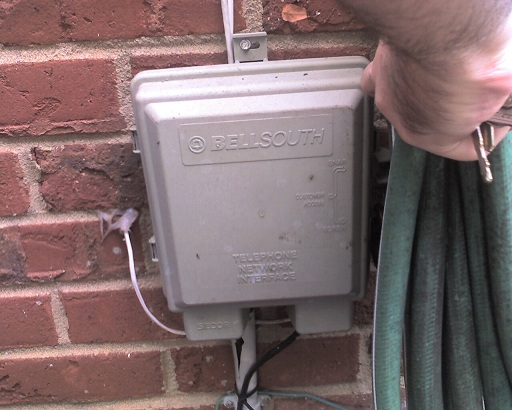
Comcast's first step into cable-based phone service was Digital Phone. What's the difference? Well, those with the newer Digital Voice (DV) may have noticed that with it, the cable comes into the digital modem (or "MTA") which is inside your house, and out of that comes the phone signal via a normal phone wire that that's fed from the MTA into a normal wall phone jack somewhere nearby inside the house, and that then feeds the rest of the house its signal. There's no more need for any phone line to come into the house, so any outside wire like at the plain old telephone system (POTS) network interface device (or "NID") is disconnected. (picture)

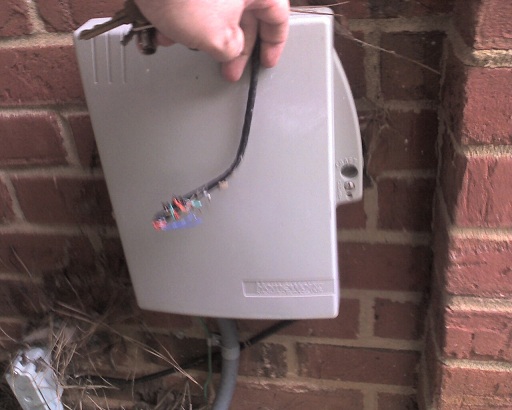
But you may (as we) for a while have used Comcast Digital Phone (which came out before Comcast Digital Voice). And it's important to understand the difference, for this problem. DP worked in a way that was closer to the plain old telephone system (also referred to as POTS). The comcast coax cable from the street went first into a box that was on the OUTSIDE of the house (very much like the one used by the POTS, but a different one: picture). And out of that DP box came both the cable (which went on into the house like it had before installing DP) and also out of it came a phone line, which then was connected to the old phone system box/NID a few feet away, specifically to the phone jacks inside it that then fed phone signal into the house just as it always had in the POTS. (here's a picture)

When they switched us to Digital Voice last year, naturally that phone line into the house (through the POTS NID) was no longer needed, so whoever did the DV install of course removed the phone line going from the DP box into the NID to feed the house, and they set up the MTA inside the house, and so on as needed for the newer DV.

But here's the kicker and what the guy found 2 weeks ago: the DV installer had not only left the old DP box (outside, which he should have removed), but he also left the cable (coax) running through that outside DP box (updated info) and inside of it, it was going through a unit intended to take the DP phone signal out to feed it to the POTS phone box. Then the cable line went out of that box and on into the house. Most important, the rep pointed out that that unit inside the DP box was powered (they had tapped into the power line when they installed that DP box a couple years ago).

Power to the old DP box was interfering with the cable signal

Well, the problem was that the power to that box (and the unit inside through which the cable signal was passing) was directly interfering with the cable signal going out (which of course feeds the TV, phone/DV, and internet service). That would explain a lot of the problems we were having!

So he removed the old DP box (and its power line) updated: opened the old DP box and removed the powered unit inside of it, leaving the box but also disconnecting the power to it. More important he connected the cable inside the unit at that point (what went from the street, and what went into the house) so it was now uninterrupted. The signal is effectively "pure" going into the house, where it then goes to the MTA (the digital modem), and that (as for the last year) feeds the phone line, and the internet service and cable TV that are from there fed into the rest of the house.

So far all has been much better.

Your next steps

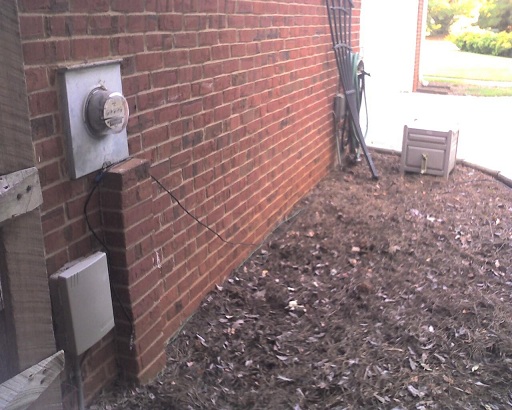
If you're not sure if this may be an issue for you (maybe someone had it setup even before you moved into a house in recent years), go out and check if there's a box outside your house on a wall near your phone box that looks like the old phone box. Or find where you cable comes into the house and see if it goes through some other box first, since they may have installed the DP box (or its equivalent) elsewhere outside your house and run a long line to the old phone box. Since that old phone line will likely have been removed, you may not see that.

If you have one of these boxes, and the cable goes into it and then out of it and on into your house, you may well have this problem. Another clue will be if you do (or don't) see a thick power cable feeding into the box. Since it's powered, you won't be able to open the DP box (well, you may find it has a "consumer" side that you can open, just like the old phone system NID, for you to test the phone line outside the house, but that won't show you the cable line to see if it's going through a powered unit as I described.)

But if you have something like this, call Comcast (or your provider, if in a situation like this) to have someone come out and confirm and if so remove it (which should be free, I'd think, especially if they offered the old service to you).

You may then enjoy DV, internet, and tv a whole lot more.

Could be a broader problem

Again, the problem may be generic to other cable systems (RoadRunner, Adephia, Time Warner, Cox, Charter) if they also have offered two generations of phone-over-cable service (or your house may have had it, even if from another provider, before you moved in).

Since setting up things like DV is mostly an "all inside" thing now, some installers may never even think to look at this potential problem. All they may do is unplug the old phone line going into the house and come in and setup the MTA and say, "enjoy". I wonder how many people could be suffering this problem and not know it.

Hope that helps someone.

Update

After writing the entry, I went out to take pictures of the units (which I've added as links above, keeping them rather hi-res to make them more legible). I realized I was mistaken when I said he had removed the old DP box. He had not. But what he did was remove the powered unit inside it and disconnected the power to it (he said) and left the box. I've corrected that above. The problem with this, though, for your diagnosis is that you have no way of knowing--if you do see that second box, the DP one--whether the cable line inside it is still going through the powered unit that should have been removed. You really have no choice, it seems, but to ask Comcast (or your provider) to come out and ocnfirm this, if you are having problems that seem otherwise unresolvable. Sorry for the confusion, but still, I hope it all helps someone.

How would you run code against multiple CF versions at once using IIS on XP?

If you use IIS on XP, have you ever wished you could put your code in one directory and run it against different versions of CF, easily. In this note, I show you how.

Someone asserted on a list that some code failed as of CF8, but I tested it against 8, 7, 6, and 5, and it worked the same in all. Hearing that, someone else asked, "Charlie, are you running all those on the same machine or on vmware?"

I assume that the reader, like many, is using IIS on XP, which doesn't let you have more than one web site, which might seem to make it impossible, though some may know the tricks I'll mention.

Of course, folks running on Apache, or IIS on Win2k3 or Win2k Server, would just say, "create different web sites, and install each CF version into a different web site".

Fair enough, but how do you solve this using IIS on XP (or Wink2 workstation), if you can't have multiple sites? That's what I explain below.

Before I go on, though, let me make an important for those who may not be aware: you certainly can run multiple versions of CF on a single machine. They each get installed in their own directories, with their own JVM (as of CF6). The challenge is just to avoid port conflicts and external web server conflicts.

But why not just use the built-in web server?

Sure, if you use the built-in web server available in CFMX since 6, then you can indeed run multiple CF versions each with their own web docroot without conflict.

But that's not the point here. That would cause each CF instance to have its own wwwroot, and you'd have to put your code there to run it on that version.

And I have even explained in a recent blog entry that you can get around that using virtual mappings in the JRun web server, pointing to the shared document directory. But sometimes you really want to use IIS for some reason, or you just don't want to have to remember to use the right port and virtual directory name configured for the built-in web server.

But you can have multiple web sites in XP, if you know how...

Yep, some will want to note that you can indeed create multiple web sites in XP, if you use the right tools. I've written about such tools before. It's just that you can't run them at once, so you have to enable/disable each time you want to run the test. To me, that more of a hassle than just doing the one-time configuration which I discuss below.

So how do you configure things using IIS on XP?

OK, I hope I've headed off complaints some may have. Oh, well, I should add one more: what I'm about to show you is definitely not supported by Adobe. Some might even argue against doing it. Certainly, if you have problems with things while trying to work this way, they're going to tell you to use a vanilla setup.

Still, it's worked for me for years. In fact, I first wrote about it in a CFDJ article back in Sep 03 (co-authored with Jeff Houser). That was written in the timeframe of people moving from CF5 to CFMX and wanting to set things up this way, but the concept still applies even for those moving from 7 to 8, or 6 to 7. It also mentioned using the same approach for running against BD as well, which means it would apply also to Railo and Smith, etc.

Finally, since writing that article, I've also realized a few things I could have added to the article, which further motivates me writing this entry.

How I set things up

So, as explained in the article (which shows you the actual steps in IIS), I configure different IIS virtual directories called _cf5, _cf6, _cf7, and _cf8. I set each to points their CFM extension (and related CF ones) to the appropriate web server extension that would be used if I'd configured each server to work with IIS (like C:\CFusion\BIN\ISCF.DLL for 5, C:\CFusionMX\runtime\lib\wsconfig\1\jrun.dll for 6, and so on).

More important, I have them all point at the same, single document root (in my case, c:\inetpub\wwwroot). That allows me to then run code in that single directory against different editions, using a url like http://localhost/_cf5/somefile.cfm, or http://localhost/_cf7/somefile.cfm, or the default http://localhost/somefile.cfm goes against CF8.

Note that you must run the web server connector for each CF edition from CFMX and above, since it only builds those jrun.dlls (I mentioned above) if you do that. See the CF docs ("Installing and Configuring ColdFusion" to learn how to run that, even after CF is installed, if you installed it using the built-in web server instead.

Before you do, though, as explained in the article, be sure to save off the path to the DLL for .cfm file extensions, as running the configuration tool will wipe over the previous path.

Some concerns using the CF Admin in this setup

There's something else to take note of about using the CF Admin (/cfide/administrator/index.cfm) when you set things up this way.

It has to do with whether, when you install each version, you tell CF to install using the built-in web server or using IIS.

In the former case, CF will put that version's CFIDE directory (and all its related files) into the wwwroot for that built-in CF server, such as c:\coldfusion8\wwwroot\ for CF8, or c:\cfusionmx7\wwwroot\ for CF7.

In the latter case (if you tell CF during installation to use IIS), then CF will place those files into the IIS docroot you name. Assuming you would always choose that c:\inetpub\wwwroot directory, that means that its CFIDE directory will be replaced with whatever is the last CF version you install.

And that means that even if using the virtual directories above, they'll all point to the last CFIDE version, which won't work (the CF Admin can only run in the version for which it's created).

Either way, you can solve this by creating yet another virtual directory, for CFIDE, inside the version-specific virtual directories above.

So if during the installation of 6, 7, or 8 you told CF to use the built-in web server, you'd point the new CFIDE virtual directory to the builtin web server's CFIDE. For my _CF6, for instance, I'd create a CFIDE virtual directory within that to point at c:\cfusionmx\wwwroot\CFIDE.

If instead you choose to install each version using IIS, then just as you needed to save off the file extension's path to the web server DLL, you would similarly need to remember before each install to save off a copy the CFIDE directory for the previous release. This is especially key for CF5, since there is no concept of a built-in web server for that.

Back when I installed CFMX 6, before doing so, I copied the CFIDE directory to call it CFIDE5 instead. (Sure, you could do a rename, but only JUST before you installed, in case you need it.) Then I created the CFIDE VD within the _CF5 VD to point to that.

It may be worth noting here that if you do install CF 6/7/8 using the built-in web server initially, and then use the web server configurator tool to then connect them to IIS, that does not move the CFIDE from the built-in web server root to the IIS docroot. So again you will need to point your CFIDE virtual directory to that CFIDE in the built-in web server.

Why not just use the built-in web server for the CF Admin?

Of course, you could just use the built-in web server to access the Admin instead, even if you are otherwise running code via IIS.

And going back to the original writer, you could indeed also do this using VMWARE. (I've written about how versions of it and Virtual PC are now free.) It might be overkill, though. Again, you don't need to worry about running multiple versions of CF on a single server. It's all just about avoiding port conflicts and potential external web server conflicts.

That's what this has been about all about: how to run all your code via IIS against multiple version of CF, all from a single directory.

Conclusion

Did this help you? Let me know. Did I forget something? Got a complaint? (People seem to love that opportunity. Go for it.) I hope it has helped some of you. It's certainly helped me, and others who I've shown it to.

More Entries

BlogCFC was created by Raymond Camden. This blog is running version 5.005.

Managed Hosting Services provided by
Managed Dedicated Hosting