New for CF9 (and 9.0.1): a query timeout that may really work, with a caveat
Note: This blog post is from 2010. Some content may be outdated--though not necessarily. Same with links and subsequent comments from myself or others. Corrections are welcome, in the comments. And I may revise the content as necessary.This is a very interesting change in CF9 (and 9.0.1), which has slipped under the radar for the most part it seems.
Did you know there is now a setting in the DSN page of the CF Admin (for most of the Adobe-provided DB drivers) which allows you to set a maximum timeout for queries against that DSN?
It's a new feature enabled for the DataDirect drivers, as updated in CF 9. (You will not see it if you use an "other" datasource type, such as when using a downloaded JDBC driver that you implement on CF.)
The caveat? This timeout is ONLY settable there in the DSN definition, not in CFQUERY (or CFSTOREDPROC) itself, which is a shame. The existing TIMEOUT attribute for those (CF10 added it for CFSTOREDPROC) is not the same and generally does not work. Still, the value of this even at the DSN level is too important to ignore for some challenges. More on that (and some other thoughts) in a moment.
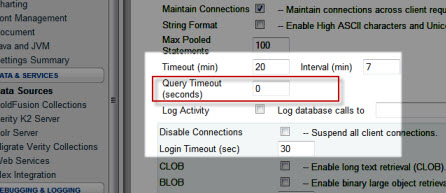 As for the setting, it's in the "Advanced Settings" section for a DSN in the CF Admin for CF 9 (or greater), and it's called "Query Timeout". This should not to be confused with the older settings, "Timeout" (which is about inactive connections) or "Login Timeout" (which is about logging in to the connection). The screenshot at right shows all 3. (This blog entry continues, with more information below it.)
I've run a test (more below), and it really does do the job (at least in that testing), which is huge.
Why us this an important development?
It's been a long-time issue that if a CFQUERY got hung up waiting for a response, that request thread (doing the CFQUERY) is then hung until the query finishes, which can sometimes be many minutes, or even hours or days, due to some odd situations. More important, a thread waiting for a query with no timeout can't be terminated (by the JVM, or CF, or the monitoring tools) because the thread was in a native thread state.
With this new option specified, if the request exceeds the timeout, the request does now fail, with a JDBC error, "Execution timeout expired." The same test does NOT timeout with the older cfquery TIMEOUT attribute.
(If you want some code to use to test a request waiting a long time for the DB to return, most databases offer a statement that tells the DB to wait for some time. In SQL Server, that's WAITFOR DELAY 'hrs:mins:secs'. Just use that in a CFQUERY, assuming your DSN definition doesn't limit what SQL statements you can use, in the 'Allowed SQL' section of the Advanced Settings page.)
If you're suffering situations where requests are hanging due to long-running queries, and you have not been able to solve the real root cause for why they are hanging (which I always recommend first and foremost), then at least this option can help avoid a situation where queries can run without time limit. An Admin can decide that no queries should be allowed to run more than x seconds.
Beware impacting all queries
With this power comes responsibility, of course, and caution. You wouldn't want to preclude someone being able to run a query that really needed to take a long time. That's why it's really better if this was settable on a per-query basis. (And no, the CF page timeout settings are NOT the solution here, because again as I said above, they cannot timeout some kinds of long-running tags, like CFQUERY, CFHTTP, CFINVOKE of a web service, etc.)
What one could do, though (for now), is create different DSNs, where one could be used for most query processing, and another could be used for long-running requests. Yes, it's ok to have 2 DSNs point to the same DB. This same technique has been used when wanting to have most queries run against one DSN with a limited set of "allowed SQL" (per the DSN advanced settings) while another DSN has unfettered SQL access.
More to consider about the new setting
Here are some other notes on the new feature:
- It works with most of the database drivers. I have confirmed that the setting appears in the DSN settings page for SQL Server, Oracle, MySQL (datadirect), DB2, Informix, Sybase) in CF 9 Enterprise, and in both SQL Server and MySQL (Datadirect) on CF 9 Standard, for example. It will not be there if you choose "other" for the datasource type, to point to some other JDBC driver.
- The timeout's specified in seconds.
- You can learn more in the CF Admin guide, in this specific page.
- Oddly, the Admin manual page above only references this new setting in that CF Admin manual is in the the MySQL settings, but again it does appear in all the drivers above.
- The manual page does even reference the other DBMSs by name in its naming the methods of the Admin API (for other DBMSs) which you can use as well, which can be used to set this default setting in the DSN programmatically.
- That said, again there is sadly no new QueryTimeout (or QTimeout) attribute for CFQUERY, so for now we can only set this at the datasource level, not per query.
- If you look under the covers (in [cf]\lib\neo-datasource.xml), there is in fact a querytimeout connectionstring that this setting controls. If only there was a way we could pass connectionstring values to the CFQUERY, we'd be golden. Some may recall use used to have just such an attribute (ConnectString), but sadly it was deprecated in CF 6. I did try it, to no avail.
- I
will raisehave raised a bug with Adobe to get a new attribute for CFQUERY related to this.When I do that, I'll report it here.It's bug 83592. Please add your vote of support for it. - There's another page on this Admin setting, in the CF Dev Guide, for those who may be interested in following any other possible places where this feature may be discussed (in the comments there).
I think this is a very important setting, and though it has been a hidden gem, it seems, it's one that people should consider. That's why I've flagged this in my CF911 category.
Hope this is helpful to some. Let me know what you think, whether this was helpful or if you feel I left something out. Especially please let me know if you may know of a way that we can indeed pass querystring values on a per-query basis.
For more content like this from Charlie Arehart:Need more help with problems?
- Signup to get his blog posts by email:
- Follow his blog RSS feed
- View the rest of his blog posts
- View his blog posts on the Adobe CF portal
- If you may prefer direct help, rather than digging around here/elsewhere or via comments, he can help via his online consulting services
- See that page for more on how he can help a) over the web, safely and securely, b) usually very quickly, c) teaching you along the way, and d) with satisfaction guaranteed






from the cfdocs
Maximum number of seconds that each action of a query is permitted to execute before returning an error. The cumulative time may exceed this value.
For JDBC statements, ColdFusion sets this attribute. For other drivers, see the driver documentation.
Both this attribute and the the new admin setting will result in the query timing out and generating a jdbc error.
I did fail to clarify in the entry that it does not work, but the whole point in identifying that this was new functionality was to clarify that it added something that was in fact new.
So no, to be clear, the same tests I did with the old TIMEOUT did NOT work (did not timeout), but when I added that new querytimeout DSN setting, they DID timeout. I have added clarifications of this in the entry above for future readers.
So is the last line of your comment quoting the docs, or your own experience? I thought most people had already concluded long ago (like me, and my recent testing) that the CFQUERY TIMEOUT did not do the job.
That's why this seems to be big news. Care you clarify? I'd hate people to think that your comment has dismissed the value of my entry above. Indeed, this is why I'm asking people for feedback.
I'll also add a comment here (and will update the entry above for future readers) that this new "query timeout" is indeed a new DataDirect driver feature, for the new release of the drivers that were implemented in CF9. So this really is a new feature, not just some curious Admin interface change.
@Ryan, thanks for the validation.
And for the suggested workaround (using two DSNs, one with the setting and one without), I'll just clarify that I did suggest that (see the end of the next to last section above).
My understanding has been that the query level timeout would work only when using the SQL Server driver, and otherwise has no effect. I decided to test it quickly and found that indeed that a tag level cfquery timeout did work. Here's my sample code and the exception that it threw, using CF 9.0 on Windows 7 and SQL Server Express 2008.
[cfquery name="TOTest" datasource="MySQLServer" timeout="10"]
WAITFOR DELAY '000:00:30'
select getdate() as now
[/cfquery]
[cfdump var="#TOTest#"]
Error Executing Database Query.
[Macromedia][SQLServer JDBC Driver]Execution timeout expired.
Then I added the Query Timeout for the datasource in the CFAdmin, set to 20 seconds. I found that the tag level timeout has priority since the query again timed out in 10 seconds. Removing the tag level timeout and leaving the CF Admin Query Timeout, the query then timed out at 20 seconds.
Presently I have MySQL also running, so I'll try that out too. I expect that the tag level won't work there, and hope that the new Query Timeout that you've described here does.
Thanks for this little gem - it's been a great quick fix!
Just to add my own findings, the timeout only seems to apply to individual queries - not a cftransaction of queries.
I had a big batch of queries all wrapped in a transaction. Unfortunately, as this batch took several minutes to run, page requests were building up as they waited to access the db.
With this setting, I can now timeout those page requests after 30 seconds and give the user a nice friendly error message telling them to come back later. The big batch cftransaction keeps running without problems.
We use PostgreSQL and there is not a query timeout option in CFAdmin for that driver.
And despite not setting a timeout attribute in our cfquery tags we still get query timeout error messages for long running SQL tasks.
On our test server the request timeout is set to 15 minutes and the query timeouts well within this value - so we're a little lost with working out where the timeout is set. We didn;t seem to ever have this issue with CF7 (we skipped 8) - and we have always had long running SQL for reports.
I'd certainly apprciate - anything you might think of.
Gavin.
Now, I realize you're saying it's all timing out before what you expect, and of course besides the CF Admin timeout setting, there is also the possibility that some other template in the request (an included file or called CFC, or in the application cfc/cfm) may have used CFSETTING REQUESTTIMEOUT.
Back to the issue of CF reporting the timeout on the wrong line, see a blog entry I did in the past on this:
http://www.carehart....
Let is know what you find out.
PS If you remain really stuck, note as well that I'm available for consultation to help solve throny CF problems (with no minimum time commitment, and a satisfaction guarantee). More at http://www.carehart....
after reading your post and all the comments. I tried cfquery with timeout and it worked like it should be. See below:
Error Executing Database Query.
Statement cancelled due to timeout or client request
The error occurred in
1 : <cfquery datasource="xx" timeout="10">
2 : SELECT SLEEP(20);
3 : </cfquery>
Coldfusion 8.0.1 Enterprise and MySQL 5.0.51a
I don't know why, but it doesn't seems to be the case in my environment. Just so you know, maybe it's not a general problem.
take care,
Sami
I'd go further and say that the CFQUERY TIMEOUT attribute might work also, even when a query DOES take a long time to execute, but it is feeding query response data back to CF. Perhaps CF could interrupt that, even if the query would otherwise have taken a long time to finish completely, if CF got sent data from the DB after the timeout was reached.
All that said, I do appreciate that I made the assertion myself, in the blog entry, about using the SQL Server equivalent (waitfor delay) to test things, so I understand why you may have used that for your own testing.
I just wonder if perhaps besides these distinctions about whether the query is doing real work, or is returning data, it may be also that things could work differently depending on one's version of CF, the OS it's running on, the db driver, the version of that driver, the db server, the version of that DB, the OS it's running on, and so on.
In that respect, I appreciate that some have offered here the specifics of the platforms they are testing things on. Perhaps over time we may find some pattern. :-) But until then, I'll just hope that if someone finds that the CFQUERY TIMEOUT attribute does NOT work for them, that perhaps the timeout in the DSN *may* work for them. That was my real goal here, to point that out. :-)
Cheers.
Windows 7 + CF9.0.1 + SQL Server 2008
Windows Server 2008 + CF8.0.1 + SQL Server 2005
On the subject of adding a new queryTimeout attribute for the cfquery tag: Why add a new attribute when we already have a "timeout" attribute? If it's possible to make it work, then it should work. The only reason to add a new parameter would be if it had a different meaning than the old one, and as far as I can tell it wouldn't in this case. In other words, the focus should be entirely on making the existing timeout attribute work in as many environments as possible.
I just stumbled across this blog post. Nice work documenting this. A coupla things:
The current ticket URL is https://bugbase.adob... (the old one dun't work any more).
That ticket is "closed" / "cannot reproduce". Which - as per my comment against it - strikes me as an odd reaction to a feature request! Do you understand what Adobe mean by this?
Cheers.
--
Adam
Maybe they didn't even read the blog entry (though I did point to it in the bug report), so didn't really understand what I was talking about. They may have some test where the old cfquery timeout attribute worked, and didn't go further to see/understand how the new DSN feature specifically added new functionality that addressed offering a better timeout.
Indeed, you can see from comments by others above (including long-time CFers) that there can be misunderstanding.
I fear that somehow some people just don't read carefully and bring presumptions into their quick conclusions about what I was trying to say here.
Not sure what we can do about Adobe's having closed the bug, though. I don't see any info to know who did it or when. I'll send an email to some contacts, but I don't know what may come of it.
I'll at least change the link to the bug report. Thanks. It's lamentable that in creating the new URLs they couldn't put in place a rewrite rule to pass old urls to the new one. :-(
I checked the bug report and found it was closed January 25th of 2012. The bug description is two part. One part being the new "query timeout" setting at the datasource config level and that it would be helpful to have the equivalent "querytimeout" attribute on CFQuery. The second part of the description is the supporting argument that the reason "querytimeout" would be useful is because the CFQuery tag's "timeout" does not work.
The engineer assigned to review the issue started with the supporting argument that the CFQuery's "timeout" doesn't work and tried to reproduce that by testing it with Oracle 11g.
The problem with the supporting argument is that it was rather vague, and could have benefited by the qualification "timeout doesn't work for many of the drivers" rather that implying that it doesn't work at all. The engineer took a narrow interpretation of the supporting argument, tested one driver, found it worked, and then because the supporting argument *as written" was invalid. That appears to be why the bug was closed, never getting the the larger issue that this was an enhancement request for expanding the dsn level "query timeout" to the per query level usage with the suggested "querytimeout" attribute.
Please let me know if I didn't communicate that well.
I think the enchancement request is still valid and that it in fact the supporting argument for it is also valid once you consider that not all drivers support CFQuery's timeout attribute. (Surely one or more of your blog entries describes this in detail, but as additional reference here's my own: http://www.talkingtr... )
I would recommend either contacting Rakshith or Rupesh to request reopening the issue (pointing them to this discussion), or open a new enhancement request that is better worded than the original to avoid misinterpretations.
Hope that helps!
In our case, we are using SQL Server mirroring, and to get that to work we had to use the "Other" data source type and then we specify a custom JDBC URL. Our URL starts with jdbc:macromedia:sqlserver, so it appears we are indeed using the SQL Server JDBC driver, but we are passing custom parameters. I am not a DBA, nor am I a JDBC expert, so I am not enirely sure how this stuff works. But I just thought I'd pass along my experience of the timeout not working.
@JJ, sorry I missed your note from Feb. Of course, by now you may know that FusionReactor 5 no longer requires "wrapping" of dsn's, so perhaps the concern is now moot?
To be clear, the setting is labelled "Query Timeout" and appears just as I show in the screenshot above. But i hear you saying you don't see that. I don't understand why you wouldn't see it...
...unless you are perhaps using a CF Admin where your web server is pointing mistakenly at a version of the CFIDE code which is NOT from at least CF9 (when the feature was added). That's a more common problem than many realize, though I would of course (like you) expect that if you did it it would be showing you images (if not text also) mentioning the "wrong" release.
I've not heard anyone else here indicate any problem accessing the setting in CF 10 and 11, but then few seem to know about it and many may not have seen this entry to comment.
If you find something out, do let me know, but it sure seems you should have it.
I decided to try to discover which DSN types have this Query Timeout setting. I found the setting in these DSN types:
DB2 Universal Database
Informix
Microsoft SQL Server
MySQL DataDirect (but not MySQL 5)
Oracle
Sybase
All of the other DSN types did not have this Query Timeout setting, at least on the CF 10 Enterprise server I was looking at. Oh, and the server is Windows.
Folks could confirm this themselves: if you look at the CF Admin "settings summary" page you will see that even a DSN that is for a "normal" CF db type will get turned into a JDBC URL under the covers, as shown on that summary page. And if you set the timeout field (discussed in this blog post) for such "normal" CF DB types, you can then see on that page that CF sets a querytimeout connection string. I've even seen it set it to 0 if turned off, and maybe it's always done that but I'd not noticed before.
Sorry for the delay. I don't know why I didn't research and offer this here back during these discussions from 2014. Oh well, better late than never, for future readers I hope.