Switching among source windows in Eclipse/CFEclipse
Note: This blog post is from 2006. Some content may be outdated--though not necessarily. Same with links and subsequent comments from myself or others. Corrections are welcome, in the comments. And I may revise the content as necessary.Those who know me well know I'm a big fan of keyboard shortcuts. I could give a whole session on them (and perhaps someday will), so I want to share one that I learned and which is useful if using Eclipse, CFEclipse, or FusionDebug. While many know ctrl-tab will swap among windows in many programs, that doesn't work in Eclipse. Try ctrl-F6 instead, which will show a drop down list of open files and let you scroll forward through them. To go backwards in the list, use Shift-ctrl-f6. Cheers.
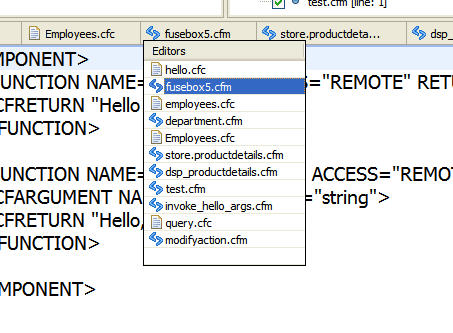
PS For other keyboard shortcuts I've shared, going beyond things related to CF, check out the category/tag on the topic at my other (older) blog, tipicalcharlie.com: http://www.tipicalcharlie.com/tags/?/keyboard%2Bshortcuts (domain gone, page recovered from Archive.org)
PPS The entry above on ctrl-f6 is just one more point to be made about looking at Eclipse as a whole when using either CFE or FD. Don't just focus on what those plug-ins add, but rather also on the built-in features of the Eclipse interface which may help you with day-to-day functionality.
Update: Since writing this in 2006, note the several comments below where people offered still more. And of course since then CFBuilder has come out, and with its built-in Aptana offers still more of them. Indeed, in a talk I did on hidden gems, I list other shortcuts for switching windows.
For more content like this from Charlie Arehart:Need more help with problems?
- Signup to get his blog posts by email:
- Follow his blog RSS feed
- View the rest of his blog posts
- View his blog posts on the Adobe CF portal
- If you may prefer direct help, rather than digging around here/elsewhere or via comments, he can help via his online consulting services
- See that page for more on how he can help a) over the web, safely and securely, b) usually very quickly, c) teaching you along the way, and d) with satisfaction guaranteed






In Eclipse:
Window / Preferences
General / Keys
Scroll all the way down to the bottom. About 12th from the BOTTOM you will see category "Next Editor".
Double Click that line. The modify screen for that action will open up.
Set focus to the Key Sequence section, and hit CTRL-TAB, then click the ADD button. You should now see TWO commands for "Next Editor". You can now select the original one, and click Delete.
Hit Apply... and Bob's yer uncle.. You are sorted
Instead of CTRL (Or Apple key if you are on a mac) + F6, CTRL + E I find is easier on the fingers and does the same :)
First, David's Ctrl+pgdn/up does indeed work more like ctrl-tab then either of the others. It just jumps to the next or previous open file. Interestingly, when at the right-most displayed file, it switches to working like the Ctrl-E option Andy mentions.
And that differs from the ctrl-f6 option in the way that Dan mentions: it shows the pop up of files like ctrl-f6, but it adds the ability to type in characters to find matching file names.
All very nice. I didn't know about any of them so I hope that one of them appeals to readers. Cheers.
It's:
CTRL + TAB to move forward through the list
CTRL + SHIFT + TAB to move backward through the list
That's how I've got my mappings.
I find myself using it even when I am switching between editors that are open! I also use the Ctrl-Tab(F6) or Ctrl-E, but seem to get all the functionality of Ctrl-E with Ctrl-Shift-R, and have the ability to open new files to boot.